OpenID Connect 1.0
Authelia can act as an OpenID Connect 1.0 Provider as part of an open beta. This section details implementation specifics that can be used for integrating Authelia with an OpenID Connect 1.0 Relying Party, as well as specific documentation for some OpenID Connect 1.0 Relying Party implementations.
See the OpenID Connect 1.0 Provider and OpenID Connect 1.0 Clients configuration guides for information on how to configure the Authelia OpenID Connect 1.0 Provider (note the clients guide is for configuring the registered clients in the provider).
This page is intended as an integration reference point for any implementers who wish to integrate an OpenID Connect 1.0 Relying Party (client application) either as a developer or user of the third party Relying Party.
OpenID Certified™
Authelia is OpenID Certified™ to the Basic OP / Implicit OP / Hybrid OP / Form Post OP / Config OP profiles of the OpenID Connect™ protocol.
For more information on certified implementations please see the OpenID Foundations publicized Certified OpenID Providers & Profiles and Certified OpenID Providers for Logout Profiles tables. We will actively perform the tests on each version of Authelia to maintain the latest conformance standard.
You can view our published conformance tests at Certified OpenID Providers & Profiles and Certified OpenID Providers for Logout Profiles.
OpenID Connect Protocol Suite
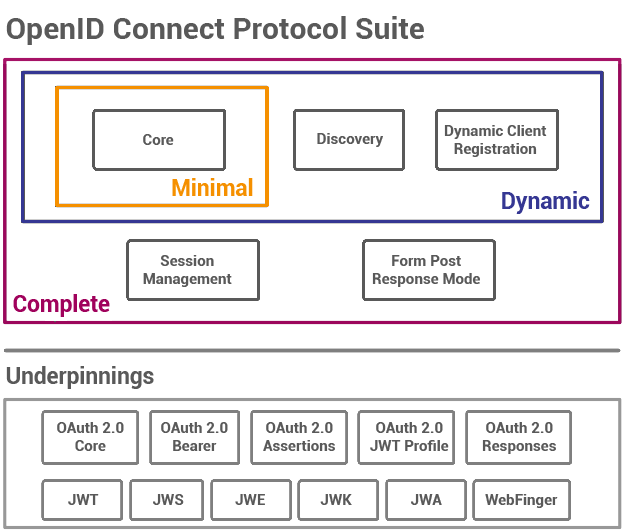
The elements we support are Core, Discovery, and the Form Post Response Mode; as well as all the underpinnings except WebFinger. This leaves Dynamic Client Registration and Session Management as obvious goals which are both planned.
Audiences
When it comes to OpenID Connect 1.0 there are effectively two types of audiences. There is the audience embedded in the ID Token which should always include the requesting clients identifier and audience of the Access Token and Refresh Token. The intention of the audience in the ID Token is used to convey which Relying Party or client was the intended audience of the token. In contrast, the audience of the Access Token is used by the Authorization Server or Resource Server to satisfy an internal policy. You could consider the ID Token and it’s audience to be a public facing audience, and the audience of other tokens to be private or have private meaning even when the Access Token is using the JWT Profile for OAuth 2.0 Access Tokens.
It’s also important to note that except RFC9068 there is basically no standardized token format for an Access Token or a Refresh Token. Therefore, there is no way without the use of the Introspection endpoint to determine what audiences these tokens are meant for. It should also be noted that like the scope of a Refresh Token should effectively never change this also applies to the audience of this token.
For these reasons the audience of the Access Token, Refresh Token, and ID Token are effectively completely separate and Authelia treats them in this manner. An ID Token will always and by default only have the client identifier of the specific client that requested it and will lack the audiences granted to the Access Token as per the specification, the Access Token will always have the granted audience of the Authorization Flow or last successful Refresh Flow, and the Refresh Token will always have the granted audience of the Authorization Flow.
You may adjust the derivation of the ID Token audience by configuring a claims policy and changing the id_token_audience_mode option.
For more information about the opaque Access Token default see Why isn’t the Access Token a JSON Web Token? (Frequently Asked Questions).
Signing and Content Encryption Algorithms
OpenID Connect 1.0 and OAuth 2.0 support a wide variety of signature and encryption algorithms. Authelia supports a subset of these.
Response Object
Authelia’s response objects can have the following signature and content encryption algorithms (i.e. the alg
parameter):
| Algorithm | Key Type | Hashing Algorithm | Use | JWK Default Conditions | Notes |
|---|---|---|---|---|---|
| HS256 | Symmetric 1 | SHA-256 | sig | N/A | Not supported for all response objects. |
| HS384 | Symmetric 1 | SHA-384 | sig | N/A | Not supported for all response objects. |
| HS512 | Symmetric 1 | SHA-512 | sig | N/A | Not supported for all response objects. |
| RS256 | RSA | SHA-256 | sig | RSA Private Key without a specific algorithm | Requires an RSA Private Key with 2048 bits or more |
| RS384 | RSA | SHA-384 | sig | N/A | Requires an RSA Private Key with 2048 bits or more |
| RS512 | RSA | SHA-512 | sig | N/A | Requires an RSA Private Key with 2048 bits or more |
| ES256 | ECDSA P-256 | SHA-256 | sig | ECDSA Private Key with the P-256 curve | Requires an ECDSA Private Key with a 256 bit curve |
| ES384 | ECDSA P-384 | SHA-384 | sig | ECDSA Private Key with the P-384 curve | Requires an ECDSA Private Key with a 384 bit curve |
| ES512 | ECDSA P-521 | SHA-512 | sig | ECDSA Private Key with the P-521 curve | Requires an ECDSA Private Key with a 512 bit curve |
| PS256 | RSA (MGF1) | SHA-256 | sig | N/A | Requires an RSA Private Key with 2048 bits or more |
| PS384 | RSA (MGF1) | SHA-384 | sig | N/A | Requires an RSA Private Key with 2048 bits or more |
| PS512 | RSA (MGF1) | SHA-512 | sig | N/A | Requires an RSA Private Key with 2048 bits or more |
| RSA1_5 2 | RSA | N/A | enc | N/A | Requires an RSA Private Key with 2048 bits or more |
| RSA-OAEP | RSA (MFG1) | N/A | enc | N/A | Requires an RSA Private Key with 2048 bits or more |
| RSA-OAEP-256 | RSA (MFG1) | SHA-256 | enc | N/A | Requires an RSA Private Key with 2048 bits or more |
| A128KW | Symmetric 1 | N/A | enc | N/A | Uses the client_secret |
| A192KW | Symmetric 1 | N/A | enc | N/A | Uses the client_secret |
| A256KW | Symmetric 1 | N/A | enc | N/A | Uses the client_secret |
| dir | Symmetric 1 | N/A | enc | N/A | Uses the client_secret |
| ECDH-ES | ECDSA | N/A | enc | N/A | Requires an ECDSA Private Key |
| ECDH-ES+A128KW | ECDSA | N/A | enc | N/A | Requires an ECDSA Private Key |
| ECDH-ES+A192KW | ECDSA | N/A | enc | N/A | Requires an ECDSA Private Key |
| ECDH-ES+A256KW | ECDSA | N/A | enc | N/A | Requires an ECDSA Private Key |
| A128GCMKW | Symmetric 1 | N/A | enc | N/A | Uses the client_secret |
| A192GCMKW | Symmetric 1 | N/A | enc | N/A | Uses the client_secret |
| A256GCMKW | Symmetric 1 | N/A | enc | N/A | Uses the client_secret |
| PBES2-HS256+A128KW | Symmetric 1 | N/A | enc | N/A | Uses the client_secret |
| PBES2-HS384+A192KW | Symmetric 1 | N/A | enc | N/A | Uses the client_secret |
| PBES2-HS512+A256KW | Symmetric 1 | N/A | enc | N/A | Uses the client_secret |
In addition to the algorithms listed above, the value none is often accepted to indicate no signing and/or encryption
should take place.
Request Object
Authelia accepts request objects with the following signature and content encryption algorithms (i.e. the alg
parameter):
| Algorithm | Key Type | Hashing Algorithm | Use | Client Authentication Method |
|---|---|---|---|---|
| none | None | None | N/A | N/A |
| HS256 | Symmetric 1 | SHA-256 | sig | client_secret_jwt |
| HS384 | Symmetric 1 | SHA-384 | sig | client_secret_jwt |
| HS512 | Symmetric 1 | SHA-512 | sig | client_secret_jwt |
| RS256 | RSA | SHA-256 | sig | private_key_jwt |
| RS384 | RSA | SHA-384 | sig | private_key_jwt |
| RS512 | RSA | SHA-512 | sig | private_key_jwt |
| ES256 | ECDSA P-256 | SHA-256 | sig | private_key_jwt |
| ES384 | ECDSA P-384 | SHA-384 | sig | private_key_jwt |
| ES512 | ECDSA P-521 | SHA-512 | sig | private_key_jwt |
| PS256 | RSA (MGF1) | SHA-256 | sig | private_key_jwt |
| PS384 | RSA (MGF1) | SHA-384 | sig | private_key_jwt |
| PS512 | RSA (MGF1) | SHA-512 | sig | private_key_jwt |
| RSA1_5 2 | RSA | N/A | enc | private_key_jwt |
| RSA-OAEP | RSA (MGF1) | N/A | enc | private_key_jwt |
| RSA-OAEP-256 | RSA (MGF1) | SHA-256 | enc | private_key_jwt |
| A128KW | Symmetric 1 | N/A | enc | client_secret_jwt |
| A192KW | Symmetric 1 | N/A | enc | client_secret_jwt |
| A256KW | Symmetric 1 | N/A | enc | client_secret_jwt |
| dir | Symmetric 1 | N/A | enc | client_secret_jwt |
| ECDH-ES | ECDSA | N/A | enc | private_key_jwt |
| ECDH-ES+A128KW | ECDSA | N/A | enc | private_key_jwt |
| ECDH-ES+A192KW | ECDSA | N/A | enc | private_key_jwt |
| ECDH-ES+A256KW | ECDSA | N/A | enc | private_key_jwt |
| A128GCMKW | Symmetric 1 | N/A | enc | client_secret_jwt |
| A192GCMKW | Symmetric 1 | N/A | enc | client_secret_jwt |
| A256GCMKW | Symmetric 1 | N/A | enc | client_secret_jwt |
| PBES2-HS256+A128KW | Symmetric 1 | N/A | enc | client_secret_jwt |
| PBES2-HS384+A192KW | Symmetric 1 | N/A | enc | client_secret_jwt |
| PBES2-HS512+A256KW | Symmetric 1 | N/A | enc | client_secret_jwt |
Encryption Algorithms
Authelia accepts request objects and generates response objects with the following encryption algorithms (i.e. the enc parameter):
| Algorithm | Notes |
|---|---|
| A128CBC-HS256 | Default for all JWE types |
| A192CBC-HS384 | |
| A256CBC-HS512 | |
| A256CBC-HS512 | |
| A128GCM | |
| A192GCM | |
| A256GCM |
Parameters
The following section describes advanced parameters which can be used in various endpoints as well as their related configuration options.
Response Types
The following describes the supported response types. See the OAuth 2.0 Multiple Response Type Encoding Practices for
more technical information. The default response modes column indicates which response modes are allowed by default on
clients configured with this flow type value. The value field is both the required value for the response_type
parameter in the authorization request and the
response_types client configuration
option.
| Flow Type | Value | Default Response Modes Values |
|---|---|---|
| Authorization Code Flow | code | form_post, query |
| Implicit Flow | id_token token | form_post, fragment |
| Implicit Flow | id_token | form_post, fragment |
| Implicit Flow | token | form_post, fragment |
| Hybrid Flow | code token | form_post, fragment |
| Hybrid Flow | code id_token | form_post, fragment |
| Hybrid Flow | code id_token token | form_post, fragment |
Response Modes
The following describes the supported response modes. See the OAuth 2.0 Multiple Response Type Encoding Practices for
more technical information. The default response modes of a client is based on the Response Types
configuration. The value field is both the required value for the response_mode parameter in the authorization request
and the response_modes client
configuration option.
| Name | Supported | Value |
|---|---|---|
| OAuth 2.0 Form Post | Yes | form_post |
| Query String | Yes | query |
| Fragment | Yes | fragment |
| JARM | Yes | jwt |
| Form Post (JARM) | Yes | form_post.jwt |
| Query String (JARM) | Yes | query.jwt |
| Fragment (JARM) | Yes | fragment.jwt |
Grant Types
The following describes the various OAuth 2.0 and OpenID Connect 1.0 grant types and their support level. The value
field is both the required value for the grant_type parameter in the access / token request and the
grant_types client configuration option.
| Grant Type | Supported | Value | Notes |
|---|---|---|---|
| OAuth 2.0 Authorization Code | Yes | authorization_code | |
| OAuth 2.0 Resource Owner Password Credentials | No | password | This Grant Type has been deprecated as it’s highly insecure and should not normally be used |
| OAuth 2.0 Client Credentials | Yes | client_credentials | If this is the only grant type for a client then the openid, offline, and offline_access scopes are not allowed |
| OAuth 2.0 Implicit | Yes | implicit | This Grant Type has been deprecated and should not normally be used |
| OAuth 2.0 Refresh Token | Yes | refresh_token | This Grant Type should only be used for clients which have the offline_access scope |
| OAuth 2.0 Device Code | Yes | urn:ietf:params:oauth:grant-type:device_code |
Client Authentication Method
The following describes the supported client authentication methods. See the OpenID Connect 1.0 Client Authentication OAuth 2.0 Client Authentication documentation for more information. The value field is the valid values for the token_endpoint_auth_method client configuration option.
| Description | Value | Credential Type | Supported Client Types | Default for Client Type | Assertion Type |
|---|---|---|---|---|---|
| Secret via HTTP Basic Auth Scheme | client_secret_basic | Secret | confidential | N/A | N/A |
| Secret via HTTP POST Body | client_secret_post | Secret | confidential | N/A | N/A |
| JSON Web Token (signed by secret) | client_secret_jwt | Secret | confidential | N/A | urn:ietf:params:oauth:client-assertion-type:jwt-bearer |
| JSON Web Token (signed by private key) | private_key_jwt | Private Key | confidential | N/A | urn:ietf:params:oauth:client-assertion-type:jwt-bearer |
| OAuth 2.0 Mutual-TLS | tls_client_auth | Private Key | Not Supported | N/A | N/A |
| OAuth 2.0 Mutual-TLS (Self Signed) | self_signed_tls_client_auth | Private Key | Not Supported | N/A | N/A |
| No Authentication | none | N/A | public | public | N/A |
Client Assertion Audience
The client authentication methods which use the JWT Bearer Client Assertions such as client_secret_jwt and
private_key_jwt require that the JWT contains an audience (i.e. the aud claim) which exactly matches the
full URL for the token endpoint and it must be lowercase.
Per the RFC7523 Section 3: JWT Format and Processing Requirements this claim must be compared using RFC3987 Section 6.2.1: Simple String Comparison and to assist with making this predictable for implementers we ensure the comparison is done against the lowercase form of this URL.
Authentication Method References
Authelia currently supports adding the amr Claim to the ID Token utilizing the RFC8176 Authentication Method
Reference values.
The values this Claim has, are not strictly defined by the OpenID Connect 1.0 specification. As such, some backends may expect a specification other than RFC8176 for this purpose. If you have such an application and wish for us to support it then you’re encouraged to create a feature request.
A list of RFC8176 Authentication Method Reference Values can be found in the reference guide.
Introspection Signing Algorithm
The following table describes the response from the Introspection endpoint depending on the introspection_signing_alg.
When responding with the Signed JSON Web Token the JSON Web Token typ header has the value of
token-introspection+jwt.
| Signing Algorithm | Encoding | Content Type |
|---|---|---|
none | JSON | application/json; charset=utf-8 |
RS256 | JSON Web Token | application/token-introspection+jwt; charset=utf-8 |
RS384 | JSON Web Token | application/token-introspection+jwt; charset=utf-8 |
RS512 | JSON Web Token | application/token-introspection+jwt; charset=utf-8 |
PS256 | JSON Web Token | application/token-introspection+jwt; charset=utf-8 |
PS384 | JSON Web Token | application/token-introspection+jwt; charset=utf-8 |
PS512 | JSON Web Token | application/token-introspection+jwt; charset=utf-8 |
ES256 | JSON Web Token | application/token-introspection+jwt; charset=utf-8 |
ES384 | JSON Web Token | application/token-introspection+jwt; charset=utf-8 |
ES512 | JSON Web Token | application/token-introspection+jwt; charset=utf-8 |
User Information Signing Algorithm
The following table describes the response from the UserInfo Endpoint depending on the userinfo_signed_response_alg.
| Signing Algorithm | Encoding | Content Type |
|---|---|---|
none | JSON | application/json; charset=utf-8 |
RS256 | JSON Web Token | application/jwt; charset=utf-8 |
RS384 | JSON Web Token | application/jwt; charset=utf-8 |
RS512 | JSON Web Token | application/jwt; charset=utf-8 |
PS256 | JSON Web Token | application/jwt; charset=utf-8 |
PS384 | JSON Web Token | application/jwt; charset=utf-8 |
PS512 | JSON Web Token | application/jwt; charset=utf-8 |
ES256 | JSON Web Token | application/jwt; charset=utf-8 |
ES384 | JSON Web Token | application/jwt; charset=utf-8 |
ES512 | JSON Web Token | application/jwt; charset=utf-8 |
Endpoint Implementations
The following section documents the endpoints we implement and their respective paths. This information can traditionally be discovered by Relying Parties that utilize OpenID Connect Discovery 1.0, however this information may be useful for clients which do not implement this.
The endpoints can be discovered easily by visiting the Discovery and Metadata endpoints. It is recommended regardless of your version of Authelia that you utilize this version as it will always produce the correct endpoint URLs. The paths for the Discovery/Metadata endpoints are part of IANA’s well known registration but are also documented in a table below.
These tables document the endpoints we currently support and their paths in the most recent version of Authelia. The paths are appended to the end of the primary URL used to access Authelia. The tables use the url https://auth.example.com as an example of the Authelia root URL which is also the OpenID Connect 1.0 Issuer.
Well Known Discovery Endpoints
These endpoints can be utilized to discover other endpoints and metadata about the Authelia OP.
| Endpoint | Path |
|---|---|
| OpenID Connect Discovery 1.0 | https://auth.example.com/.well-known/openid-configuration |
| OAuth 2.0 Authorization Server Metadata | https://auth.example.com/.well-known/oauth-authorization-server |
Discoverable Endpoints
These endpoints implement OpenID Connect 1.0 Provider specifications.
| Endpoint | Path | Discovery Attribute |
|---|---|---|
| JSON Web Key Set | https://auth.example.com/jwks.json | jwks_uri |
| Authorization | https://auth.example.com/api/oidc/authorization | authorization_endpoint |
| Device Authorization | https://auth.example.com/api/oidc/device-authorization | device_authorization_endpoint |
| Pushed Authorization Requests | https://auth.example.com/api/oidc/pushed-authorization-request | pushed_authorization_request_endpoint |
| Token | https://auth.example.com/api/oidc/token | token_endpoint |
| UserInfo | https://auth.example.com/api/oidc/userinfo | userinfo_endpoint |
| Introspection | https://auth.example.com/api/oidc/introspection | introspection_endpoint |
| Revocation | https://auth.example.com/api/oidc/revocation | revocation_endpoint |
Security
The following information covers some security topics some users may wish to be familiar with. All of these elements offer hardening to the flows in differing ways (i.e. some validate the authorization server and some validate the client / Relying Party) which are not essential but recommended.
Pushed Authorization Requests Endpoint
The Pushed Authorization Requests endpoint is discussed in depth in RFC9126 as well as in the OAuth 2.0 Pushed Authorization Requests documentation.
Essentially it’s a special endpoint that takes the same parameters as the Authorization Endpoint (including Proof Key Code Exchange) with a few caveats:
- The same Client Authentication mechanism required by the Token Endpoint MUST be used.
- The request MUST use the HTTP POST method.
- The request MUST use the
application/x-www-form-urlencodedcontent type (i.e. the parameters MUST be in the body, not the URI). - The request MUST occur over the back-channel.
The response of this endpoint is JSON encoded with two key-value pairs:
request_uriexpires_in
The expires_in indicates how long the request_uri is valid for. The request_uri is used as a parameter to the
Authorization Endpoint instead of the standard parameters (as the request_uri parameter).
The advantages of this approach are as follows:
- Pushed Authorization Requests cannot be created or influenced by any party other than the Relying Party (client).
- Since you can force all Authorization requests to be initiated via Pushed Authorization Requests you drastically improve the authorization flows resistance to phishing attacks (this can be done globally or on a per-client basis).
- Since the Pushed Authorization Requests endpoint requires all of the same Client Authentication mechanisms as the
Token Endpoint:
- Clients using the confidential Client Type can’t have Pushed Authorization Requests generated by parties who do not have the credentials.
- Clients using the public Client Type and utilizing Proof Key Code Exchange never
transmit the verifier over any front-channel making even the
plainchallenge method relatively secure.
OAuth 2.0 Authorization Server Issuer Identification
The RFC9207: OAuth 2.0 Authorization Server Issuer Identification implementation allows Relying Parties to validate
the Authorization Response was returned by the expected issuer by ensuring the response includes the exact issuer in
the response. This is an additional check in addition to the state parameter.
This validation is not supported by many clients, but it should be utilized if it is supported.
JWT Secured Authorization Response Mode (JARM)
The JWT Secured Authorization Response Mode for OAuth 2.0 (JARM) implementation similar to OAuth 2.0 Authorization Server Issuer Identification allows a Relying Party to ensure the Authorization Response was returned by the expected issuer and also ensures the response was not tampered with or forged as it is cryptographically signed.
This response mode is not supported by many clients, but we recommend it is used if it’s supported.
Proof Key Code Exchange
The Proof Key Code Exchange mechanism is discussed in depth in RFC7636 as well as in the OAuth 2.0 Proof Key Code Exchange documentation.
Essentially a random opaque value is generated by the Relying Party and optionally (but recommended) passed through a
SHA256 hash. The original value is saved by the Relying Party, and the hashed value is sent in the Authorization
request in the code_verifier parameter with the code_challenge_method set to S256 (or plain using a bad practice
of not hashing the opaque value).
When the Relying Party requests the token from the Token Endpoint, they must include the code_verifier parameter
again (in the body), but this time they send the value without it being hashed.
The advantages of this approach are as follows:
- Provided the value was hashed it’s certain that the Relying Party which generated the authorization request is the same party as the one requesting the token or is permitted by the Relying Party to make this request.
- Even when using the public Client Type there is a form of authentication on the Token Endpoint.
Support Chart
The following support chart is a list of various specifications in the OpenID Connect 1.0 and OAuth 2.0 space that we’ve either implemented, have our eye on, or are refusing to implement.
Footnotes
It should be noted the key type
Symmetricnearly always uses a symmetric shared secret derived from the client secret, which means the client secret itself must be stored using a plaintext format. ↩︎ ↩︎ ↩︎ ↩︎ ↩︎ ↩︎ ↩︎ ↩︎ ↩︎ ↩︎ ↩︎ ↩︎ ↩︎ ↩︎ ↩︎ ↩︎ ↩︎ ↩︎ ↩︎ ↩︎ ↩︎ ↩︎ ↩︎ ↩︎ ↩︎ ↩︎This algorithm is strongly discouraged due to concerns about its security and it is only supported for the purpose of compatibility. ↩︎ ↩︎
This is OpenID Certified™ by it being used within one or more conformance suites which have been OpenID Certified™. This specification may not have a direct certification process but reasonable should be assumed to be certified by the requirements of another certification process. ↩︎ ↩︎
The Resource Owner Password Grant is currently heavily discouraged and deprecated by the OAuth 2.0 specifications body, disallowed by OAuth 2.0 Security Best Current Practice, and being removed in OAuth 2.1 due to the poor security qualities it has. For these reasons Authelia has very intentionally decided not to implement this Grant Type. ↩︎